A security scan uploads a Software Bill of Materials (SBOM) in CycloneDX format to the pipeline. Two project pages read that artifact and show what is in it:
| Page | Address | What it shows |
|---|---|---|
| “Dependency list” | /-/security/dependencies |
The components of the SBOM: name, version, type, license, package identifier |
| “License compliance” | /-/security/licenses |
The licenses across those components, with the number of components under each |
Both pages are read-only and open from the “Secure” section of the project sidebar.
Availability
Both pages appear in the “Secure” section only while all of these hold; otherwise their addresses answer 404:
- the “Security and compliance” feature is enabled in the project settings;
- the user has the Developer, Maintainer or Owner role in the project;
- the feature flag
fe_security_scan_policiesis enabled on the instance; - the license of the installation includes security scanning.
The feature flag fe_security_scan_policies is disabled by default. While it is off, both pages stay hidden, along with the policy and scanner integration pages. Ask an instance administrator to enable it.
Where the data comes from
Both pages read the latest pipeline of the project’s default branch, whatever its status: a running pipeline has no artifact yet, and a failed one still carries the reports its jobs uploaded with artifacts:when: always.
From that pipeline they take every job artifact of the cyclonedx report type. The codescoring scan writes one: its codescoring_sca job publishes gl-sbom.cdx.json as artifacts:reports:cyclonedx. A job in the project’s own .gitlab-ci.yml that uploads a report of the same type reaches these pages the same way.
Components from every such artifact are merged into one table. A component is kept once, recognized by its package identifier, and by its name and version when it declares no identifier. Both pages therefore show what all the analyzers of the pipeline reported together.
Nothing is stored in the database: every request reads and parses the artifacts again. Refreshing the data means running a new pipeline on the default branch.
Above the table both pages show where the SBOM came from: the pipeline status, its number, the commit, when it ran, and a download button per CycloneDX artifact — “Download SBOM”, or “Download SBOM (<job name>)” when the pipeline holds more than one. A user without access to the project’s job artifacts sees no button. The line below names the branch: “Data comes from the most recent pipeline on main. Run a new pipeline to refresh it.”
This block is absent for a project whose default branch has no pipeline at all.
Dependency list
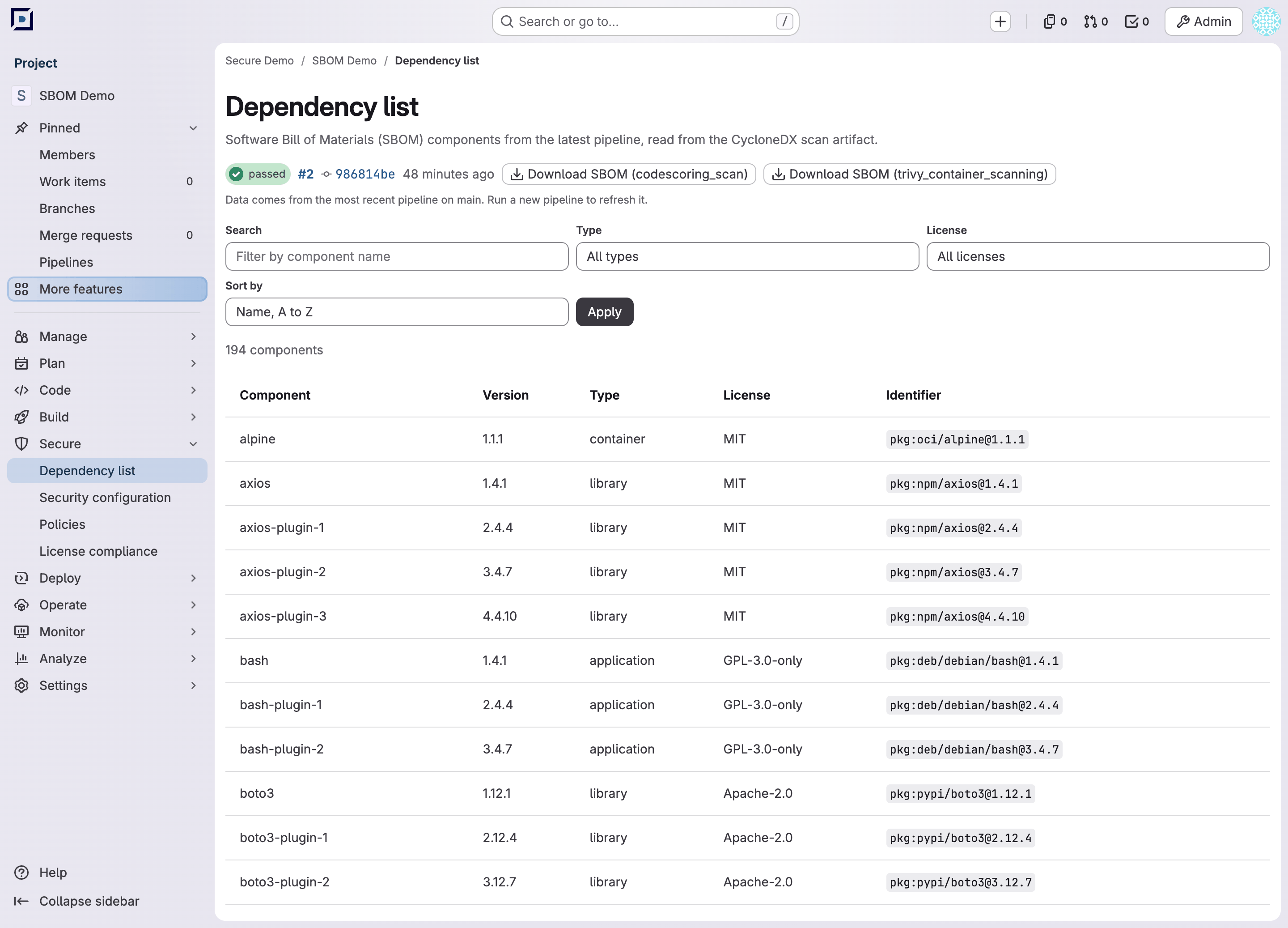
Table columns:
| Column | What it holds |
|---|---|
| “Component” | The component name from the SBOM |
| “Version” | The component version |
| “Type” | The CycloneDX component type: library, application, container and others |
| “License” | The licenses the component declares, separated by commas; “Unknown” when it declares none |
| “Identifier” | The package identifier of the component in purl format |
The table holds 50 rows per page. Above it stands the number of components in the SBOM, replaced by “6 of 194 components match the filters.” while a filter is set.
Controls above the table:
| Control | What it does |
|---|---|
| “Search” | Keeps the components whose name contains the entered text, in any case |
| “Type” | Keeps the components of one type |
| “License” | Keeps the components under one license; “Unknown” keeps the ones that declare none |
| “Sort by” | Orders the table: “Name, A to Z” (default), “Name, Z to A”, “Type”, “License” |
“Apply” applies what the controls hold. “Clear filters” appears once a filter is set and returns the whole list. The “Type” and “License” lists are built from the whole SBOM, so narrowing one of them keeps the choices of the other.
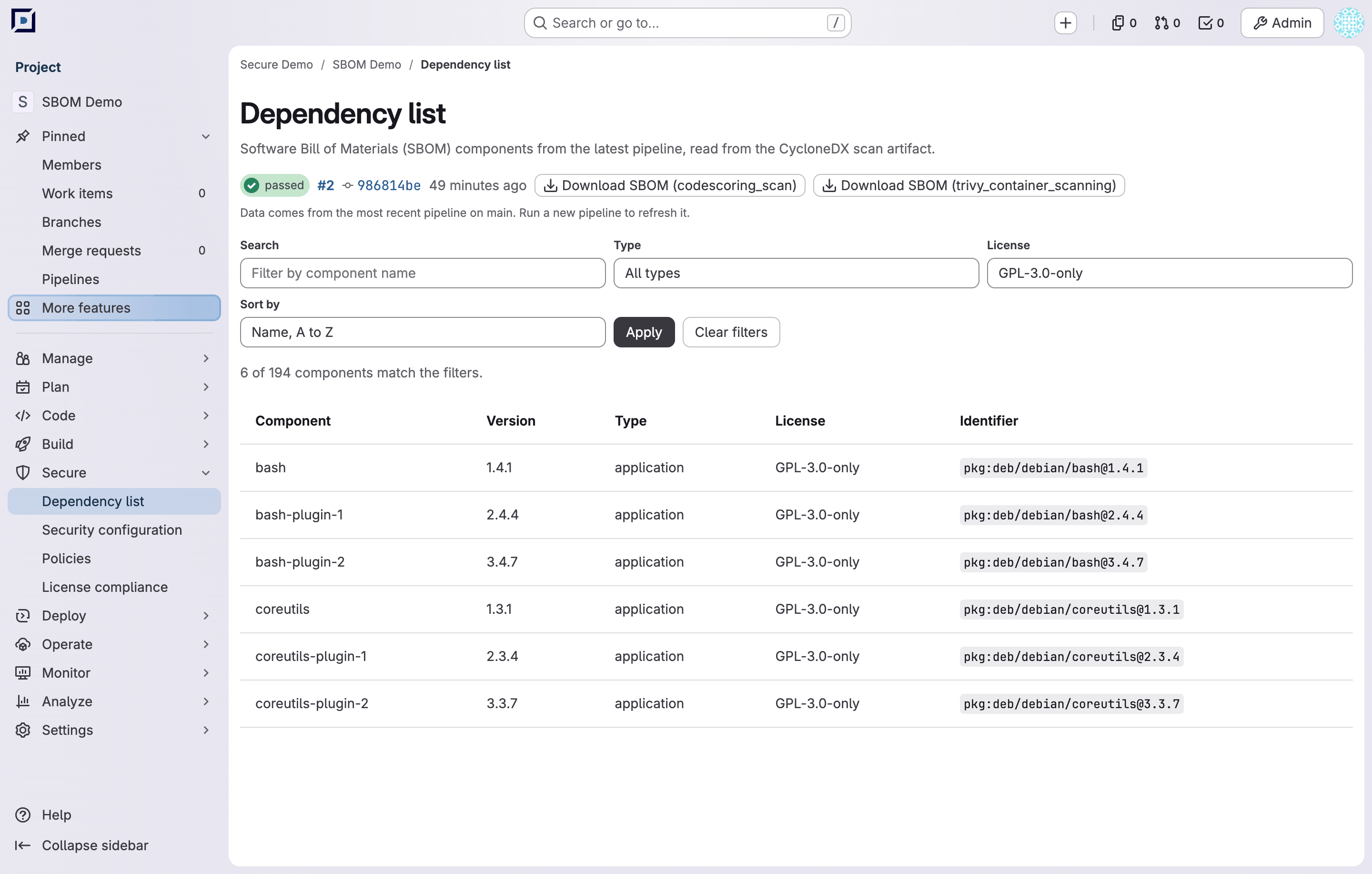
The controls are kept in the address, so a filtered list can be bookmarked or sent to a colleague: /-/security/dependencies?license=GPL-3.0-only&sort=name_desc.
A filter that matches nothing shows “No dependencies match the filters” with the hint “Change or clear the filters to see more components.”
License compliance
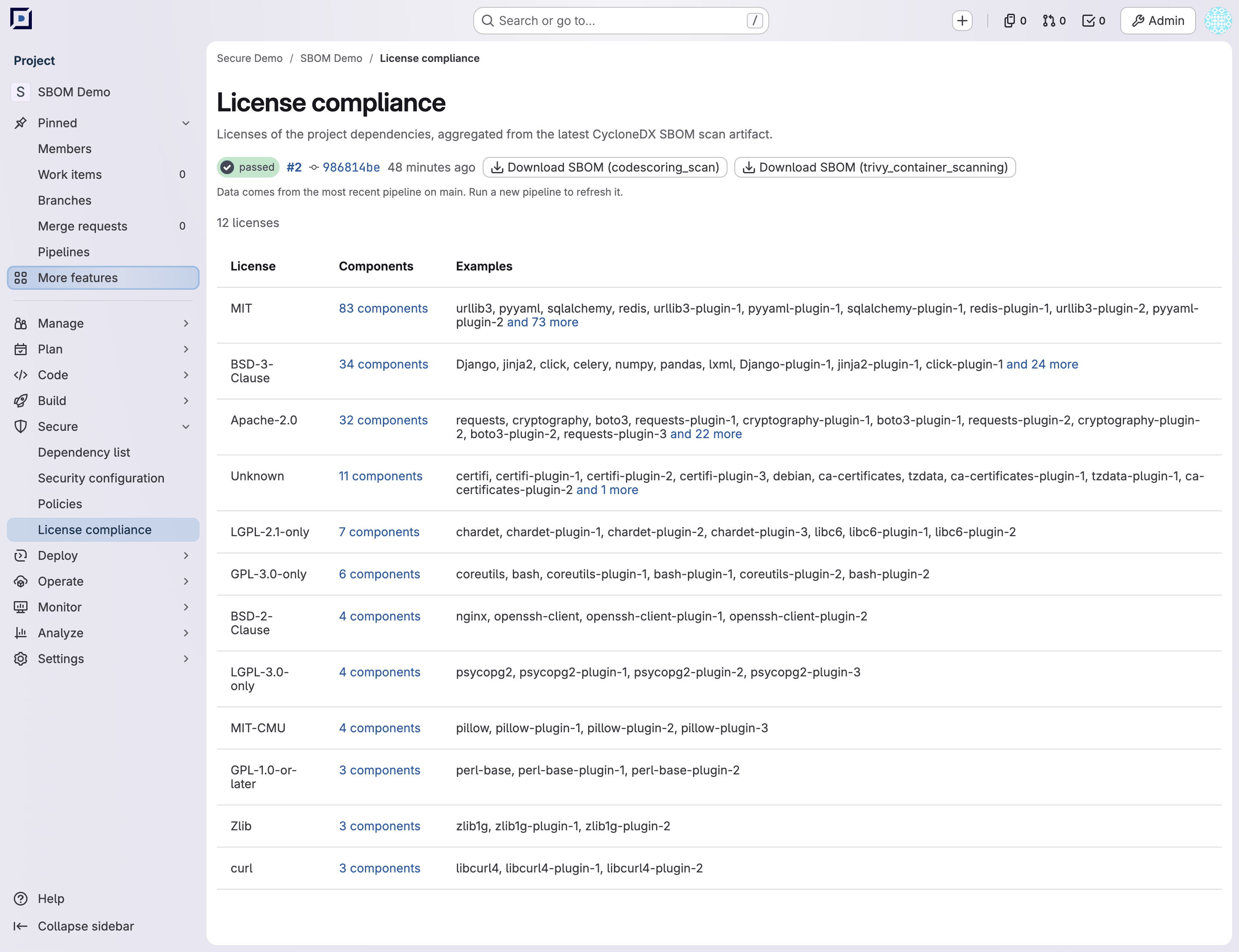
Table columns:
| Column | What it holds |
|---|---|
| “License” | The license identifier from the SBOM; “Unknown” gathers the components that declare none |
| “Components” | How many components are under the license. The number links to the dependency list filtered by that license |
| “Examples” | Up to ten component names; “and N more” links to the same filtered list |
Rows are ordered by the number of components, largest first, and alphabetically between equal counts. A component that declares several licenses is counted under each of them, so the counts add up to more than the number of components in the SBOM.
“Unknown” holds the same components on both pages, so the count in a row and the filtered list it opens agree.
Report states
| What the pipeline holds | What the pages show |
|---|---|
| No CycloneDX artifact | “No SBOM results yet” and “Run a pipeline with the CodeScoring scanner enabled to see project dependencies here.” |
| Artifacts, none of which could be read | “Could not read the SBOM report” and “The latest scan artifact could not be read. Check the CodeScoring job logs and re-run the pipeline.” |
| At least one artifact that was read | The tables. An SBOM with no components gives “No dependencies found” or “No licenses found” |
One artifact that cannot be read leaves the rest in place: the pages show what the readable ones reported. The pipeline block with the download buttons is shown in all three states, so an unreadable artifact can be downloaded and examined.
Troubleshooting
The pages are missing from the “Secure” section
Check the conditions listed in “Availability”: the project setting, your role in the project, the feature flag and the license of the installation.
“No SBOM results yet” after a pipeline that passed
The latest pipeline of the default branch uploaded no artifact of the cyclonedx report type. Check that:
- the pipeline that ran the scan is on the default branch: a pipeline of another branch or of a merge request leaves these pages empty;
- the scan job finished and uploaded its artifacts, which the “Jobs” tab of the pipeline shows;
- the path in the job’s
artifacts:reports:cyclonedxkey matches a file the job wrote.
“Could not read the SBOM report”
Download the artifact from the pipeline block and open it: the pages read a CycloneDX document in JSON. The codescoring_sca job writes the format named by the FE_SCANS_CODESCORING_BOM_FORMAT variable, cyclonedx_v1_6_json by default; another format is uploaded to the same artifact and cannot be read here.